
• Install & Activate
  • Troubleshooting
BEST Antivirus KBS : Largest Anti-Malware Knowlegde Base and Support
  • Install & Activate
  • Troubleshooting

Malwarebytes Anti-Ransomware 0.9.18.806 Release Notes

/Download, Install & Active / Malwarebytes / Download, Install & Active / Malwarebytes / Malwarebytes Business / Malwarebytes Anti-Ransomware 0.9.18.806 Release Notes
  • September 1, 2021
  • BEST Antivirus Staff 2
  • Malwarebytes / Malwarebytes Business

Contents

  1. Performance/protective capability
  2. Usability
  3. Stability/issues fixed
    1. Notice about Application Upgrades and Component Updates for Malwarebytes Anti-Ransomware:
0
(0)

Performance/protective capability

  • Improved memory usage
  • Numerous enhanced ransomware protection techniques and remediation capabilities

Usability

  • Added ability for administrators to define proxy settings during deployment via Command Line Interface (CLI)

Stability/issues fixed

  • Fixed issue where Malwarebytes Anti-Ransomware is causing the system to boot into Temporary Profile
  • Fixed issue where Malwarebytes Anti-Ransomware crashes after reboot

To update your clients to this new version, please download the latest version of Malwarebytes Endpoint Security from your confirmation email. If you cannot find your confirmation email, please contact your sales representative.

Notice about Application Upgrades and Component Updates for Malwarebytes Anti-Ransomware:

  • Application Upgrades for Malwarebytes Anti-Ransomware will not be automatically deployed once upgrades are available from Malwarebytes.  This unmanaged product will require Administrators to download the latest version of Anti-Ransomware and deploy it to their endpoints. Automatic upgrading has been turned off in order to empower Administrators to deploy upgrades at their own preferred schedule.
  • Component Updates shall continue being pushed out automatically and silently once available from Malwarebytes. These updates typically contain detection, remediation and performance enhancements that is essential in protecting Malwarebytes customers from Ransomware.

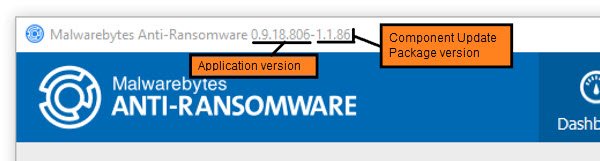
An example of this is below:
DOC-2029-1.jpg

Source : Official Malwarebytes Brand
Editor by : BEST Antivirus KBS Team

How useful was this post?

Click on a star to rate it!

Average rating 0 / 5. Vote count: 0

No votes so far! Be the first to rate this post.

(Visited 15 times, 1 visits today)
Tagged: malwarebytesmalwarebytes for business

Related Articles

  • All about Malwarebytes

  • Technical Add-on for Malwarebytes for Splunk

  • Malwarebytes Agentless Remediation app for Splunk

  • Relatórios de atividade de terminais na plataforma Nebula da Malwarebytes

  • Malwarebytes Endpoint Protection Product Lifecycle

  • Windows 2019-09 Security Update for Windows devices running Malwarebytes home products

ask or enter a search term

Top Rated Posts

5 (1)

Activate code Avast on Windows PC

5 (1)

[KB5699] Set the PIN in ESET Parental Control for Android

5 (2)

Getting started (app) (ESET)

5 (1)

[KB3239] How do I uninstall or reinstall ESET Cyber Security or ESET Cyber Security Pro?

5 (2)

[KB6842] Upgrade to ESET Cyber Security and ESET Cyber Security Pro version 6.6 fails on previous versions of macOS (10.6 – 10.8)

About

We are BEST Antivirus , Trusted Comparison and Cheap Antivirus Software 2020. KBS is Knowledge Base and Support : This page was created to guide customers through the installation and to resolve all the common errors of anti-virus software.

Partners

› Avast
› AVG
› BitDefender
› ESET
› Trend Micro
› All Partners

Resources

› Store
› Advertise
› Brand Reviews
› Review Platforms
› Contact Page
› Knowledge Base

  • Install & Activate
  • Troubleshooting
© Copyright by BEST Antivirus by SSG Limited